Generative AI is changing how creators plan, produce, edit, and distribute digital content. Instead of spending hours completing repetitive tasks, creators can use AI to speed up research, generate ideas, create visuals, edit videos, write scripts, improve audio, and personalize content. The leading generative AI features for creators focus on creativity, productivity, automation, efficiency, and real-world results.
From social media influencers and YouTubers to designers, writers, marketers, and independent freelancers, creators can now build complete content workflows with AI assistance. The technology does not simply create content from a prompt. Modern tools can understand context, follow instructions, transform existing material, and help creators refine their work.
Understanding these capabilities can help creators choose the right tools, avoid unnecessary subscriptions, and use AI as a practical creative partner rather than a replacement for human ideas.
What Are the Leading Generative AI Features for Creators?
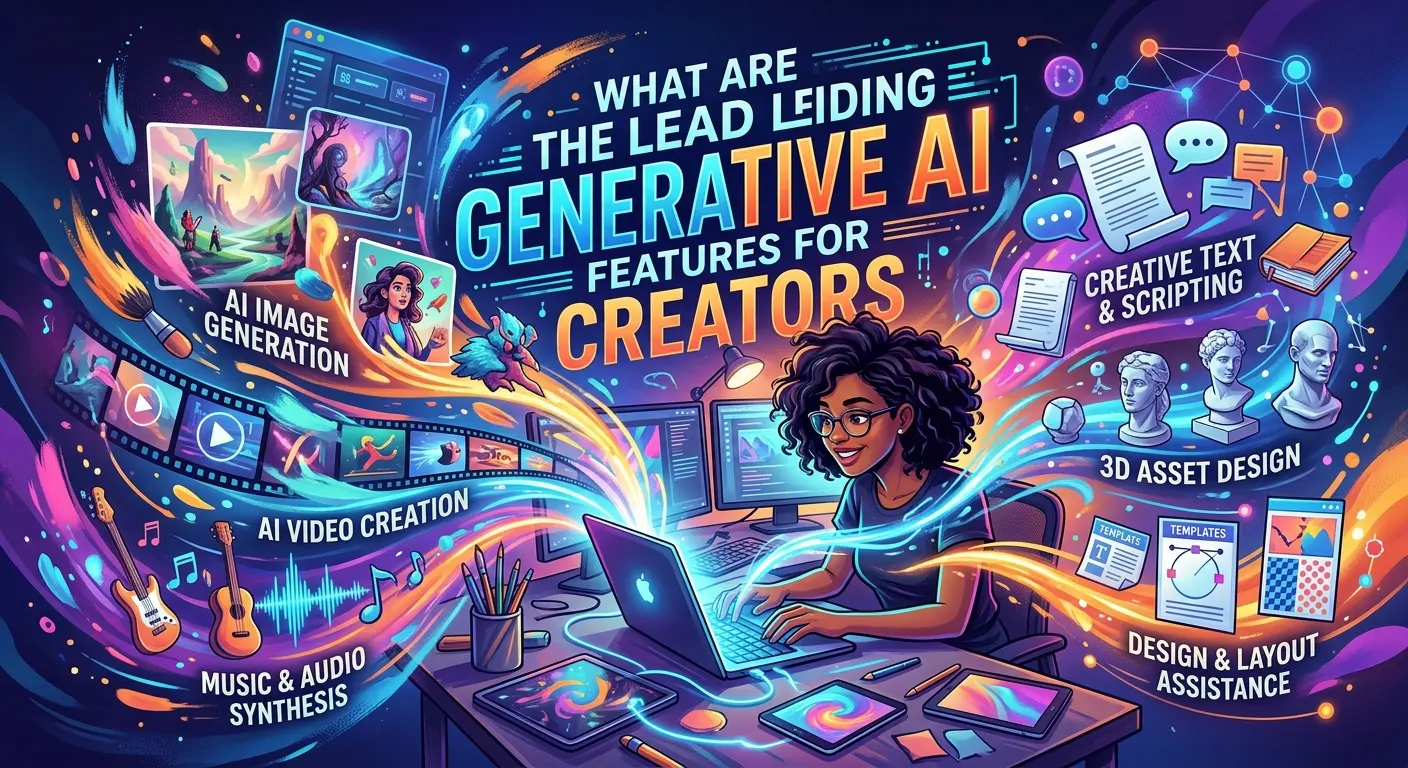
The leading generative AI features for creators are capabilities that help with content ideation, writing, image generation, video creation, audio production, editing, personalization, automation, and workflow management.
Generative AI can create new content from instructions supplied by a user. For example, a creator might provide a topic and ask AI to generate video concepts, write a script, suggest a thumbnail idea, create image prompts, or turn a long video into short-form content.
The biggest advantage is speed. A task that previously required several separate tools may now happen inside one AI-powered workflow. However, creators still need to provide direction, review results, check accuracy, and add their own creative judgment.
For example, a YouTube creator could use AI to brainstorm ten video ideas, create an outline, draft a script, generate visual concepts, remove unwanted audio noise, create captions, and produce descriptions for different platforms.
The key idea is simple: generative AI works best when it handles repetitive or time-consuming tasks while the creator remains responsible for strategy, originality, quality, and final decisions.
AI Content Ideation and Creative Brainstorming Features
One of the most useful generative AI capabilities is creative ideation. Creators often know their general topic but struggle to find fresh angles. AI can help expand a basic idea into multiple content possibilities.
A creator can provide a topic, target audience, platform, and desired format. AI can then suggest headlines, hooks, story concepts, video topics, social media posts, newsletter ideas, or campaign themes. This makes brainstorming faster and helps reduce the time spent staring at a blank page.
For example, a technology creator could enter the topic “AI tools for freelancers.” AI might suggest tutorial videos, comparison articles, beginner guides, case studies, social posts, and short-form video concepts. The creator can then select the ideas that match their expertise and audience.
AI brainstorming becomes more useful when creators provide specific context. Instead of asking for “content ideas,” include information about the audience, industry, platform, tone, goal, and content format.
Creators should also avoid publishing every AI-generated idea without review. AI can produce generic concepts, repeated trends, or suggestions that lack originality.
Best practice: use AI to expand your creative options, then apply your own experience and audience knowledge to select and improve the strongest ideas.
AI Writing, Script Generation, and Storytelling
Generative AI has become particularly useful for creators who produce written content. It can help draft blog posts, video scripts, captions, product descriptions, newsletters, social posts, outlines, and storytelling concepts.
Script generation is especially valuable for video creators. A creator can provide a topic, audience, video length, and tone and ask AI to create a structured script. AI can also generate opening hooks, transitions, calls to action, and alternative versions.
Writers can use AI for another important task: improving existing content. Instead of generating an entire article from nothing, creators can provide their own draft and ask for clearer structure, shorter sentences, stronger transitions, or alternative headlines.
This approach can preserve more of the creator’s individual voice. Human expertise remains important, particularly when content involves personal experience, technical knowledge, research, or opinions.
For better results, creators should give AI detailed instructions. Include the intended audience, objective, tone, format, important facts, and content limitations.
AI-generated writing should also receive human editing. Creators should verify facts, remove repetitive language, check claims, and make sure the final version sounds natural.
AI Image Generation and Creative Visual Design
AI image generation allows creators to turn written descriptions into visual concepts. This capability can support illustration, concept art, thumbnails, marketing graphics, backgrounds, storyboards, product concepts, and social media visuals.
The process usually begins with a prompt describing the subject, environment, composition, style, lighting, perspective, and other desired characteristics. More detailed instructions can give creators greater control over the result.
For example, a creator producing a video about future technology could generate several futuristic city concepts for use as visual inspiration. A social media creator might generate background concepts for a campaign before completing the final design in an editing application.
AI image tools can also support existing-image workflows. Depending on the tool, creators may be able to remove objects, extend backgrounds, modify specific areas, upscale images, or create variations.
However, creators should pay attention to usage rights, licensing terms, brand requirements, and platform rules. AI-generated visuals can also contain unexpected artifacts, inaccurate details, or inconsistent characters.
The strongest workflow combines AI generation with human design. AI can provide a starting point, while the creator handles composition, branding, typography, accuracy, and final quality.
AI Video Generation, Editing, and Repurposing
AI video features are among the fastest-growing capabilities available to digital creators. Modern AI tools can assist with text-to-video generation, image-to-video animation, automatic editing, captioning, scene creation, background changes, and content repurposing.
A creator can use a written concept to develop an initial video sequence or use existing images as the foundation for animated content. AI editing features can also identify important sections of longer videos and help create shorter clips for platforms that prioritize short-form content.
Automatic captions are another practical application. Instead of manually transcribing an entire recording, creators can use speech recognition to generate subtitles and then review them for accuracy.
AI can also help identify potential highlights from interviews, podcasts, webinars, or educational videos. This allows one long recording to become multiple pieces of content.
For example, a creator could record a 30-minute tutorial and use AI-assisted editing to identify several short educational segments. The creator could then adapt those clips for different platforms.
The important principle is repurposing rather than simply duplicating. Each platform has different audiences, formats, and viewing behaviors, so creators should customize the final content.
AI Audio, Voice, Music, and Podcast Creation
Generative AI can help creators produce and improve audio content. Common applications include voice generation, transcription, noise reduction, audio cleanup, podcast editing, sound effects, and music creation.
Podcasters can use AI transcription to convert conversations into written material. That transcript can then support show notes, social posts, article ideas, or short video captions.
AI-powered audio cleanup can also reduce common recording problems such as background noise or inconsistent sound levels. This can help creators working with basic microphones or less-than-perfect recording environments.
Voice generation can help with narration and certain creative projects, but creators should use it responsibly. Voice cloning and synthetic voices raise important questions about consent, identity, disclosure, and intellectual property.
Creators should never assume that a person’s voice can be copied simply because technology makes it possible. Permission, platform rules, licensing, and ethical considerations matter.
For professional projects, creators should also check the commercial terms of AI-generated music, voices, and sound effects before using them in monetized content.
AI Editing, Enhancement, and Content Transformation
AI-powered editing features can reduce the amount of manual work required to polish content. These tools can assist with image enhancement, video cleanup, background removal, object removal, resizing, reframing, noise reduction, color adjustments, and automatic formatting.
One useful capability is content transformation. A creator can take an existing piece of content and create different versions for different formats.
For example, a landscape video can potentially be reframed into a vertical short. A long article can become social media posts. A podcast transcript can become an email newsletter. A product image can be adapted into different promotional designs.
This process improves productivity because creators do not need to start from zero every time.
However, automation does not guarantee quality. AI may crop important visual information, misunderstand speech, remove the wrong object, or create unnatural edits.
Creators should always review automated changes before publishing.
A good workflow is AI-assisted rather than AI-blind: let the software perform repetitive editing, but keep human control over the final result.
AI Personalization and Audience-Focused Content
Personalization is another important generative AI capability. Instead of creating one generic message for everyone, creators can develop content variations for different audiences.
For example, an educational creator might explain the same subject differently for beginners, intermediate learners, and professionals. A marketing creator could adapt the same campaign for different customer segments.
AI can help generate different headlines, introductions, calls to action, captions, and content formats while maintaining the same core message.
This can improve relevance and engagement when used thoughtfully. However, personalization should not become misleading or overly intrusive.
Creators should avoid making unsupported assumptions about individual users. They should also respect privacy and applicable data-protection requirements.
The most effective personalization starts with real audience knowledge. AI can help adapt content, but analytics, customer feedback, comments, and creator experience provide the context needed to make those adaptations meaningful.
AI Automation and Creator Workflow Integration
Automation can turn individual AI features into a complete creator workflow. Instead of using AI for one isolated task, creators can connect different stages of production.
A typical workflow might look like this:
Research → Idea generation → Outline → Script → Visual creation → Editing → Captions → Repurposing → Publishing support → Performance analysis
AI can assist at several points in this process. Automation tools may also connect content applications with cloud storage, project-management platforms, publishing systems, or other productivity software.
For example, a creator could store video transcripts in a workspace, use AI to summarize them, generate content ideas, and prepare draft social posts.
Integration becomes especially valuable for freelancers and small teams because it reduces repetitive administrative work.
However, creators should avoid automating everything. Publishing without review can create factual errors, poor-quality content, duplicate posts, or inappropriate messaging.
The best automation removes repetitive work without removing human oversight.
Free vs Paid Generative AI Features for Creators
Many AI platforms offer free access, while advanced features often require paid subscriptions. Free plans can be useful for beginners who want to test AI-assisted workflows before spending money.
Free versions may provide limited generations, lower output quality, slower processing, fewer editing options, or restricted access to advanced models.
Paid plans may provide larger usage limits, higher-quality outputs, premium models, additional storage, commercial features, or advanced editing capabilities.
Creators should not automatically subscribe to multiple AI services. First identify the tasks that consume the most time. Then select tools that solve those specific problems.
For example, a beginner might only need one writing assistant and one image-editing tool. A professional video creator may benefit from more specialized video, audio, and editing capabilities.
Calculate value based on time saved and quality improved, not simply the number of features advertised.
Benefits, Limitations, and Common Challenges of Generative AI
The biggest benefit of generative AI for creators is productivity. AI can reduce the time required for brainstorming, drafting, editing, formatting, and repurposing.
It can also make certain creative capabilities more accessible. Someone with limited design experience can explore visual concepts. A beginner writer can generate an outline. A small business owner can produce initial marketing ideas without maintaining a large creative team.
There are also limitations. AI-generated content can contain inaccurate information, repetitive ideas, unnatural writing, inconsistent visuals, or misleading claims.
Creators also need to consider originality and intellectual property. Simply generating content with AI does not automatically make that content valuable or appropriate for every use.
Another challenge is overdependence. If creators rely on AI for every decision, their content may become less distinctive.
The practical solution is to use AI as an assistant rather than an unquestioned authority. Give it structured tasks, review the output, add personal knowledge, and make the final creative decisions yourself.
Generative AI Pricing, Tools, and Choosing the Right Features
Generative AI pricing varies significantly between platforms. Some tools offer free tiers, while others use monthly subscriptions, usage-based pricing, credits, or professional plans.
Creators should compare pricing based on actual workflow requirements. A tool that looks inexpensive may become costly if it charges heavily for high-volume image or video generation.
Before subscribing, check whether the service offers the features you actually need. Consider output quality, usage limits, export options, commercial-use terms, integrations, editing controls, privacy policies, and customer support.
Creators should also test a tool before committing when a free trial or free plan exists.
For example, if your primary goal is short-form video production, focus on video generation, editing, captions, resizing, and export features rather than paying extra for unrelated capabilities.
The best tool depends on the creator’s niche. A graphic designer, YouTuber, writer, photographer, and podcaster can have very different requirements.
Choose the workflow first and the AI tool second.
Best Practices and Common Mistakes Creators Should Avoid
Creators can get better results by writing clear prompts. Explain the goal, audience, format, tone, constraints, and desired output. If the first result is weak, refine the instructions instead of assuming the technology cannot help.
Another useful practice is to provide examples. If you want a specific writing style or visual direction, explain the characteristics you want. You can also ask AI to provide several alternatives rather than accepting its first answer.
One common mistake is publishing AI output without editing. AI can produce content that sounds convincing but contains errors. Human review remains essential.
Another mistake is using too many AI tools. A large collection of subscriptions can create unnecessary complexity. Start with a small toolkit and expand only when a new tool solves a clear problem.
Creators should also avoid copying trends without adding their own perspective. AI can identify common patterns, but originality often comes from personal experience, expertise, experimentation, and storytelling.
A strong workflow follows this principle:
AI generates possibilities. The creator provides judgment, originality, accuracy, and purpose.
The Future of Generative AI for Creators
Generative AI is moving toward more integrated creative workflows. Instead of using separate applications for writing, images, video, audio, and editing, creators are increasingly seeing these capabilities combined within broader creative environments.
Future systems are likely to become better at understanding context across multiple content types. A creator could potentially provide a topic, brand guidelines, existing content, and audience information and receive coordinated drafts across several formats.
Multimodal AI will remain important. The ability to understand text, images, audio, video, and structured information together can make creative workflows more flexible.
Another important development is greater creator control. Better editing interfaces, consistency controls, personalization, and workflow automation can make generated content easier to refine.
At the same time, creators will need to pay greater attention to authenticity, transparency, copyright, consent, privacy, and responsible AI use.
The future is unlikely to be about simply replacing creators with automated systems. Instead, AI can become a powerful production layer that allows individual creators and small teams to accomplish more.
Creators who learn how to combine AI speed with human creativity can build efficient workflows while maintaining a distinctive voice.
Frequently Asked Questions
The leading features include AI writing, idea generation, image creation, video generation, audio production, editing, content repurposing, personalization, automation, and multimodal creation. The most useful feature depends on the creator’s content type and workflow.
How can generative AI help content creators?
Generative AI can reduce the time needed for brainstorming, drafting, editing, research assistance, visual development, transcription, captions, and content repurposing. It can help creators produce more variations while keeping human review in the workflow.
Can AI create videos for creators?
Yes. Generative AI can assist with several video tasks, including creating visual sequences from prompts, animating images, generating scripts, creating captions, editing clips, and repurposing longer videos into shorter formats. The exact capabilities depend on the platform.
Can creators use AI-generated images commercially?
Commercial use depends on the specific AI platform, its terms, the content generated, and applicable laws. Creators should review the tool’s current licensing and commercial-use conditions before using generated images in monetized projects.
Are free generative AI tools enough for beginners?
Free tools can be enough for beginners who are learning AI-assisted workflows or producing content at a small scale. Paid plans may become useful when creators need higher limits, advanced models, better output quality, or professional features.
Will generative AI replace content creators?
Generative AI can automate many production tasks, but creative work still benefits from human judgment, experience, storytelling, originality, and audience understanding. AI is more useful when creators use it to increase productivity rather than surrendering all creative decisions to automation.
What is the best way to use generative AI for content creation?
Start with a specific problem. Use AI for tasks that are repetitive, time-consuming, or difficult to scale. Give detailed instructions, review the output, verify important information, and add your own expertise before publishing.
How can creators avoid low-quality AI content?
Creators should edit AI-generated material, verify factual claims, add original insights, improve examples, remove repetition, and make sure the final content genuinely helps the audience. Human review is one of the most important quality-control steps.
Can generative AI help creators save time?
Yes. AI can automate or accelerate many repetitive tasks, such as generating first drafts, creating captions, summarizing recordings, developing ideas, and adapting content to different formats. The amount of time saved depends on the creator’s workflow and the tools used.
What should creators consider before choosing an AI tool?
Consider the tool’s output quality, features, pricing, usage limits, integrations, export options, privacy practices, licensing terms, and ease of use. Most importantly, choose a tool that solves a real problem in your existing workflow.
Is AI-generated content original?
AI-generated content can be new, but originality and ownership questions can depend on how the content was produced, the tool’s terms, and applicable law. Creators should add their own creative contribution and check relevant usage requirements before commercial publication.
What is the future of generative AI for creators?
The future is likely to involve more multimodal creation, stronger editing controls, deeper workflow automation, and better integration between text, image, video, and audio tools. Human creativity, judgment, authenticity, and responsible use will remain important.
Generative AI is becoming a practical part of the modern creator toolkit. Its greatest value is not simply the ability to generate content quickly. The real opportunity comes from combining automation with human creativity, efficiency with quality, and AI capabilities with genuine expertise.
Creators who approach AI strategically can use it to explore more ideas, reduce repetitive work, repurpose existing assets, and spend more time on the parts of content creation that require human judgment. The strongest results come from treating AI as a creative assistant, reviewing its work carefully, and adding a distinctive human perspective.
As AI tools continue to develop, creators should focus less on collecting every new feature and more on building a reliable workflow. The right AI features are the ones that save meaningful time, improve creative output, and help creators deliver greater value to their audiences.